Home
Order Now
Login
Contact Us
About BarFly
Reference Material
For Code Enforcement
Welcome to BarFly
Because you are here reading this you have an interest in knowing levels of noise in your environment, your bar, your restaurant, your home, your shop, your band your neighborhood.
You may be interested in knowing your environmental noise level for health, OSHA, city ordinance, or technical reasons.
Regardless of the reason BarFly can provide these data to you. BarFly is a self-contained sound measuring device that plugs directly into a 120VAC outlet.
It has no other wires or external connections. There are no switches or buttons, using your WiFi enabled Smartphone, Laptop, Tablet, or Desktop you tell the BarFly
what the local WiFi name and password are and then it is set. It remembers the WiFi name and password even when powered down.
It has an internal microphone to "listen" to ambient sound. It is able to detect sound pressure levels from those so quiet as to be inaudible to humans to levels
causing pain and hearing damage. It can detect sound pressure levels across the full range of human hearing 20 to 20,000 Hz, although few adults can hear this
full spectrum of sound. The BarFly listens as long as it is powered. The BarFly applies a "C" weighting to the sound levels. This is a NIST specification for
correlating sound pressure levels to perceive loudness to humans. It is the normal weighting for sound pressure measurements. The BarFly takes sound level
measurements 3 times per minute. It processes these measurements with the "C" weighting factor, averages the data for every 5-minute period. It transmits the
data through the user's WiFi every 5 minutes to the BarFly central monitoring station.
You can log into your custom dashboard on BarFly.biz and review your sound level data 24/7. You can even view your data at the Code Enforcement Office or let
the Code Enforcement Officer view your data as a guest. You must approve Code Enforcement access.
Each BarFly knows its location, whether it is the top floor bar or the patio. Each BarFly reports in its own separate chart. If you have multiple locations,
the charting will be segregated by location.
Charts of Noise/Sound Levels
Standard Chart:
1st Line: Your account number and Location Name.
2nd Line: The local code enforcement noise limits by hour. For districts that limit noise to a set level above outside ambient this line will be blank.
3rd Line: The day broken in to 24 time periods. Local time.
Next Lines: Noise Levels by day. The number in the box is the percent of time where the noise levels were above the limits in the 2nd line. If GREEN, no over limit noise was recorded.
If RED, the limits were exceeded by the percentage in the box. For Example: if the box is RED and the number "17%" is listed, then the BarFly recorded over the limit noise for 17%
of that hour or approximately 10 minutes of the hour.
"nd": No data was recorded during this time period, most likely because the BarFly was not powered or the WiFi was down. If you see extended period of "nd", check if your WiFi is active.
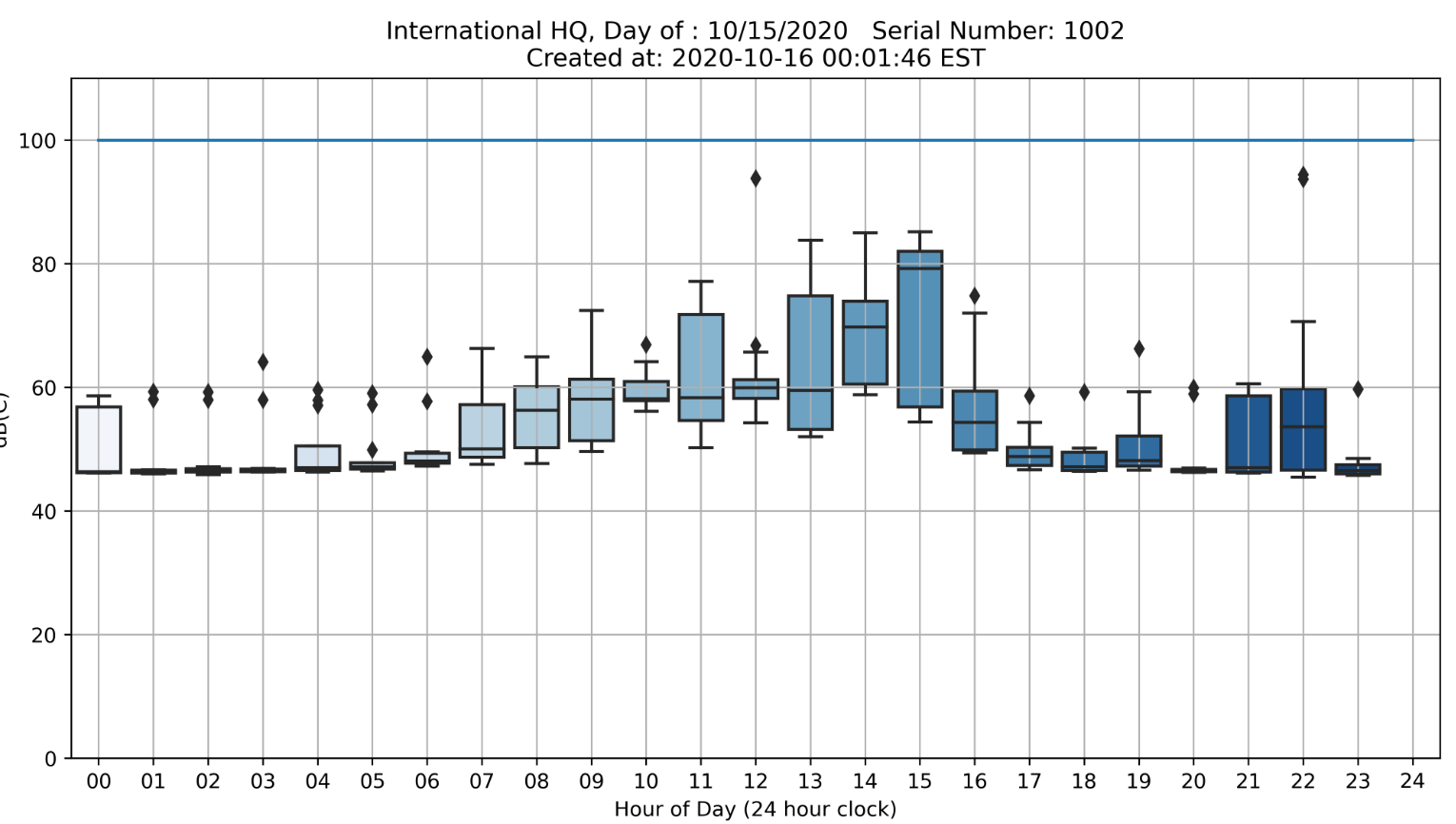
If you want a more detailed break down of a day, click on the Date in the left most column. A by the hour graph will be created. The time periods are on the 24 hour clock. "12" is
midnight and "13" is 1 AM, local time. This is a box plot and records the max sound level, those are the Diamonds above the boxes and the body of the box is the 25th to 50th
percentile of the sound levels records, basically it is the average for that hour.
The BarFly.biz website will keep available all the plots created for a user for the entire term of service or one year whichever is shorter. After that time, the plots are
erased and if the user continues the service then new plots are added.
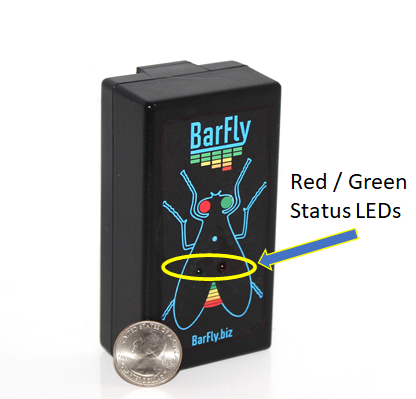
The RED and GREEN status LEDs
The BarFly has two LED lamps on the device; a RED and a GREEN. When the unit is first powered it attempts to find a WIFI connection while doing so it illuminates BOTH the RED
and GREEN LEDs for one half second for each attempt to connect to the user's WIFI. When it connects it will flash the green LED three times. While it is operating it will
illuminate the GREEN LED whenever the sound level is below a predefined limit which could be an ordinance limit or any other limit of interest. If the sound exceeds that
limit then the RED LED will illuminate until the sound level decreases below the limit, whichever is longer. Your Bar or Restaurant Manager can refer to the BarFly status
LEDs to determine if they need to adjust the sound level.
Each BarFly has a unique serial number. That number is encoded in the software within the BarFly device. It is also shown on the data plots. In this way a user may have more
than one BarFly device and have separate plots for each device. In a bar or business where live music is offered or background music or TVs are operating inside a user may have
a BarFly outside for city ordinance compliance purposes and an another inside other reasons, such as for comparison. Sometimes the ambient noise levels outside are not caused by
sound from inside. Having multiple devices can help distinguish this event.
Although the BarFly hears all the sound in its vicinity, such as a room, it does not "listen" or
record conversations. Nowhere in the system is any recording that can be played back and heard in its original form. It is not a voice recorder or a high fidelity sound or
music recorder. It's purpose is to monitor the composite sound level in an area or emanating from an establishment relative to prescribed limits. You can tell it anything
and it will record how loud you spoke but not what you said.
Tips where to place the BarFly
Noise or Sound decreases in level with distance. Where you place the BarFly is important. Placing the BarFly next to a speaker, TV or the band will result in INCORRECT readings
on the high side.
The best place for the BarFly is on a far wall from the major source of sound. A great place would be by the entrance door facing in. Objects in between the BarFly and the sound
source, such as columns, bodies etc. will attenuate the sound and cause lower readings.
Other uses for the BarFly
Noise or sound data can give you insights to your establishments' operations. It can tell you when they are open and when they close for the night. It can tell you when and how
long the band played.
A BarFly measuring outside sound levels is a powerful tool when sitting across the table from Code Enforcement. We have a client who pointed out correctly that the street was very
loud and local residents were really complaining about street noise, not the Bar.
Home
Order Now
Login
Contact Us
About BarFly
Reference Material
For Code Enforcement
InConData LLC Copyright 2020